 > Detail > Rectangle
2-D Part > CAids > Bore > Detail > Rectangle
2-D Part > CAids > Bore > Detail > Contour 
This function enables you to define a detail as a part and to insert it into the drawing part with any scale you like.
The detail will be zoomed in on.
The selected detail will be marked with a dashed circle.
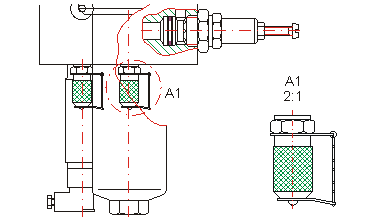
Detail A1 on scale 2:1

Related Topics
|
Version 2102 - HiCAD 2-D | Date: 15/11/2016 | © Copyright 1994-2016, ISD Software und Systeme GmbH |