Sketch > Process > Del.
Use these functions to delete graphical elements of a sketch or a 3-D sketch.
Click  to open a menu with further deleting functions.
| Edges | |

|
Delete GE, Polyline Deletes all edges of a polyline. |
| Fillets | |

|
Delete fillet/chamfer, Individual Deletes all fillet arcs or chamfers. The corresponding edges are lengthened to their common intersection point. |

|
Delete fillet, Polyline Deletes all fillets in a polyline. The corresponding edges are lengthened to their intersection point. |
| Points | |

|
Delete point, Individual Deletes individual isolated points. |

|
Delete point, Active sketch Deletes all isolated points of the active sketch / 3-D sketch. |
| Point numbers | |

|
Delete point designation, Individual Deletes individual point numbers. |

|
Delete point designation, Active sketch Deletes all point numbers of the active sketch / 3-D sketch. |

|
Delete point designation, Drawing Deletes all point numbers of the drawing. |
| Others | |

|
Merge points
Points of the active sketch / 3-D sketch lying on the same coordinate are combined into one point. |

|
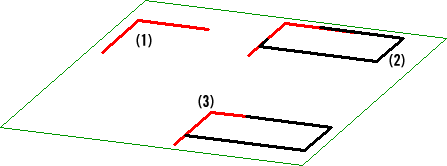
Double lines Deletes double lines, e.g. elements that coincide in a sketch.
In the image above, several additional lines (2) have been added to the original sketch (1). In the next step, the double lines have been deleted (3). |

Related Topics
Version 1702 - HiCAD 3-D | Date: 9/2012 | © Copyright 2012, ISD Software und Systeme GmbH