3-D Standard > Standard
Parts > New bolting
Use this functions to assemble and fit complete Bolting sets.
To fit a bolting, proceed as follows:
function.
Click  to open a menu with further functions for boltings:
| Process Boltings | |

|
|

|
|
| Boltings, Part assignment | |

|
|

|
|

|
|
| Change Boltings | |

|
|

|
|

|
|

|
|

|
|
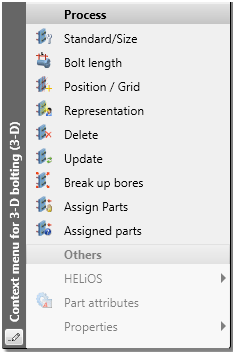
 Alternatively, you can also access these functions via the context menu for boltings.
Here, the following additional functions are available:
|
|
Bolt length |
|
|
Break up bores |
|
|
Mark assigned parts |
 You have the following options to invert a bolting, i.e. reverse its direction:

Related Topics
Standard Parts, Boltings, Weld Seams (3-D) • Settings for Boltings (3-D)
Version 1702 - HiCAD 3-D | Date: 9/2012 | © Copyright 2012, ISD Software und Systeme GmbH
 Context menu for 3-D boltings